Multilingual Self Registration
VisitorRego supports several multilingual configuration options throughout the self registration process. These options can help improve accessibility and usability for people signing in who may speak different languages.
Multilingual support within VisitorRego can include:
Multilingual support within VisitorRego can include:
- Multilingual screen graphics
- Multilingual Self Registration field labels
- Additional keyboard language support
- Multilingual Health & Safety slides
Multilingual Screen Graphics
Many of the graphical screens throughout VisitorRego can be designed to display multiple languages within the same layout.
This includes screens such as:
- Welcome screen
- Self Registration screen
- Company logo and branding
- Workflow selection screen (if workflows are enabled)
Because VisitorRego uses graphical layouts for many screens, each design can be customised to include multiple languages within the same visual element.
The following example shows a Welcome screen configured to display both English and Mandarin within the same design.
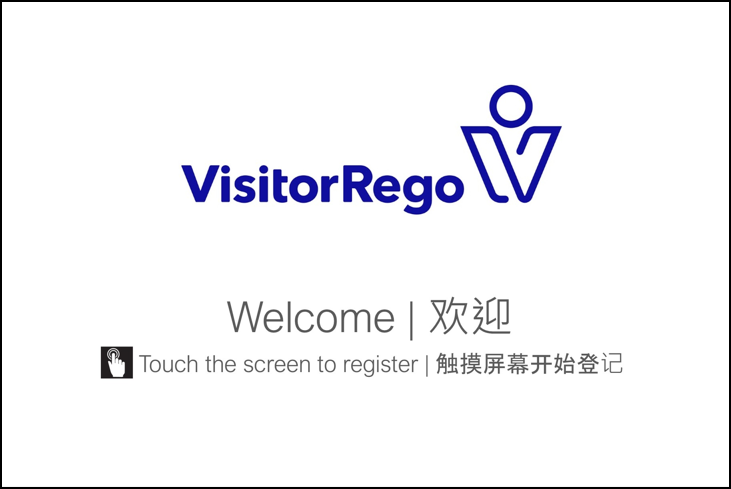
This allows key information to be presented clearly to people signing in, regardless of language.
The following example shows a Welcome screen configured to display both English and Mandarin within the same design.
This allows key information to be presented clearly to people signing in, regardless of language.
Multilingual Self Registration Field Labels
Field labels on the Self Registration screen can be customised to display multiple languages.
This may include:
- English only
- A second language alongside English
- Multiple translated labels within the same field label
Example:
Name / 姓名
Company / 公司
Email / 电子邮件
Name / 姓名
Company / 公司
Email / 电子邮件
This allows people signing in to understand required fields more easily when multiple languages are in use.
Additional Keyboard Language Support
VisitorRego’s built-in on-screen keyboard uses a simple English keyboard by default.
An enhanced keyboard can be enabled to replace the standard on-screen keyboard.
If additional keyboard languages are installed in Windows, these can then be switched between directly from the enhanced on-screen keyboard during sign-in.
This includes support for different character sets and keyboard layouts (such as AZERTY, QWERTY, or non-Latin character input) where required.
This is particularly useful for sites where people may need to enter names or information using non-English characters.
Multilingual Health & Safety Slides
Health & Safety slides can be configured to display multiple languages during the sign-in process.
This allows people signing in to view Health & Safety information in their preferred language before completing registration.
Language selection is presented on-screen, allowing users to switch between available language versions of the Health & Safety content.
When a language is selected, the corresponding version of the Health & Safety slides is displayed.
This ensures Health & Safety information can be presented clearly across different language groups at the point of sign-in.
Up to 5 languages can be configured, including the default language.

For full setup and configuration details, refer to the Languages - Multilingual Health & Safety knowledge base article.

Multilingual support within VisitorRego is achieved through a combination of configurable graphics, field labels, keyboard language support, and Health & Safety content.
Depending on site requirements, some areas of the interface may remain in English while important registration screens and information are presented in multiple languages.
For assistance configuring multilingual functionality within VisitorRego, please contact VisitorRego Support
Depending on site requirements, some areas of the interface may remain in English while important registration screens and information are presented in multiple languages.
For assistance configuring multilingual functionality within VisitorRego, please contact VisitorRego Support